Service overview
Service details
Scope, delivery details, and business outcomes.
Need CCTV for only a few days? You do not need to invest in an entire system. SyncTech provides fully managed CCTV rental for events, exhibitions, pop-up stores, construction sites, and temporary locations—from a small 4-camera temporary setup to a large system with up to 100 cameras—with recording, live and playback viewing on mobile devices, and AI video analytics.
Installation, support, and removal—fully managed. Our team handles the site survey, design, installation, configuration, training, support during the rental period, and complete system removal when the project ends.
A complete system sized for the actual site
- One complete rental package: Cameras, recording, storage, network equipment, UPS systems, monitoring displays, and the accessories required for installation.
- Flexible rental periods: From 3–7 day events and 7–30 day pop-up stores to monthly construction sites and long-term projects.
- View from anywhere: Live and recorded video through the web or mobile devices, with access configured for the operating team.
- Faster review with AI: Search events, detect people or vehicles, count movement, and trigger rule-based alerts.
- Managed throughout the project: Survey, installation, testing, training, support, and removal under the agreed scope.
Equipment selected for each project
- Recording and AI analytics: Live monitoring, recording, playback, event search, and on-system AI processing, powered by Synology Deep Video Analytics.
- IP cameras: Fixed, dome, bullet, turret, PTZ, or fisheye models for indoor or outdoor use, selected for the viewing angle, lighting, and environment.
- Storage: Hot-swappable HDDs or SSDs with RAID, sized around camera count, resolution, FPS, bitrate, recording policy, and retention.
- Network infrastructure: PoE switches, 10GbE uplinks, LAN or fiber cabling, Wi-Fi, gateways, optional 4G/5G connectivity, racks, and accessories.
- Power and monitoring stations: UPS systems, operator workstations or VisualStation, monitors, and video walls as required.
- Optional integrations: I/O modules, intercoms, IP or SIP speakers, access controllers, POS systems, and NAS archive targets, subject to compatibility.
- Licensing and service: SyncTech supplies the required device licenses and configuration, plus installation, training, health checks, support, and removal.
How AI Video Analytics Helps Your Operation
| Analytics group | Capabilities and operational benefits |
|---|---|
| Search and investigation | Semantic Video Search — Search recorded events with natural-language prompts to reduce investigation time. Attribute Search — Find people or vehicles using attributes such as clothing color, vehicle type, and vehicle color. |
| Detection and identification | People and Vehicle Detection — Distinguish people and vehicles from other objects, with optional license plate recognition workflows. Face Recognition — Compare faces with an authorized database for a defined purpose. |
| Counting | People Counting — Count people entering, leaving, or crossing a defined area. Vehicle Counting — Count vehicles passing a checkpoint or defined area. |
| Area monitoring | Intrusion Detection — Trigger an event when a person or vehicle enters a defined zone. |
Maximum AI Capacity for Large Projects
| Published maximum | Supported task types |
|---|---|
| Up to 40 tasks | People and Vehicle Detection · People Counting · Vehicle Counting · Intrusion Detection |
| Up to 20 tasks | Face Recognition · License Plate Recognition |
Note: A large system supports up to 40 concurrent real-time AI tasks in total. Our team selects and allocates the analytics that match each project's objectives.
Live View, Recording, Investigation, and Alerts in One Platform
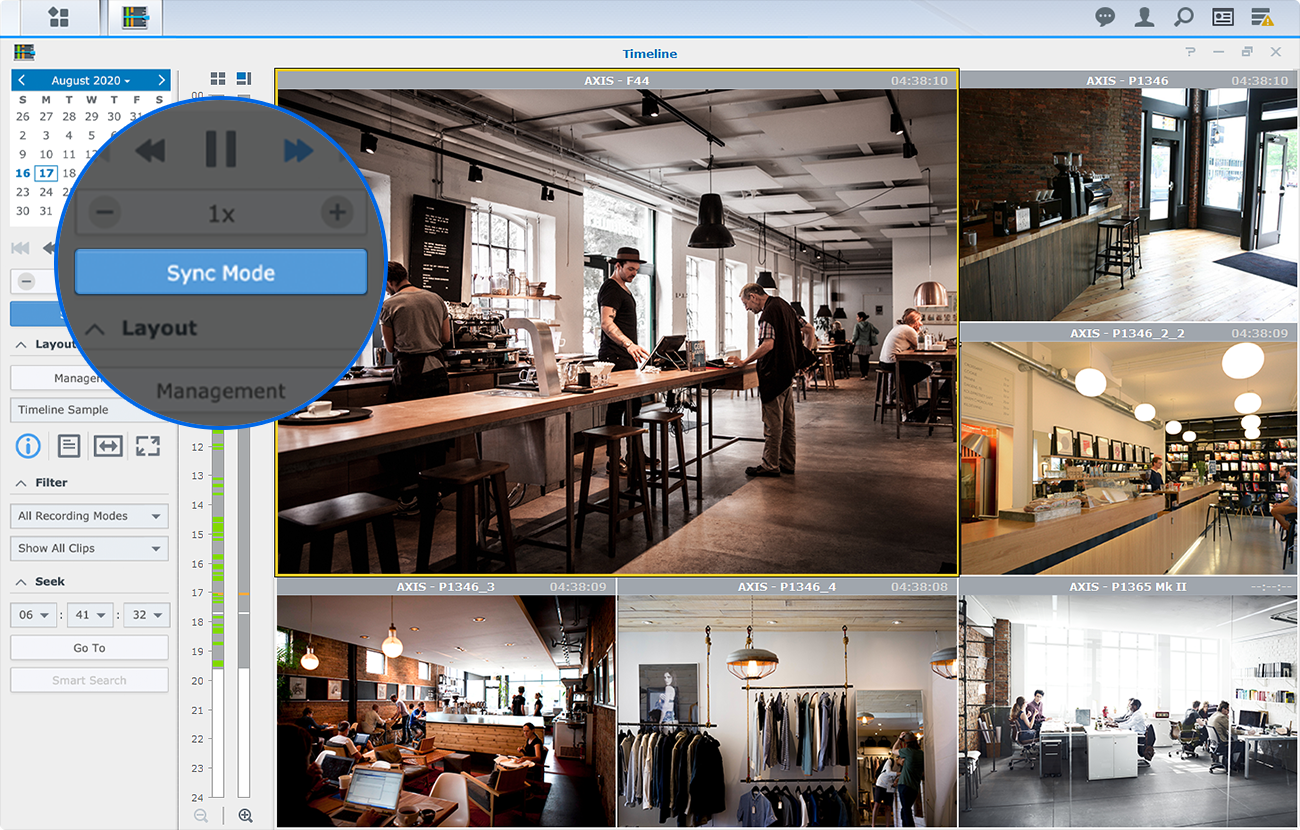
- Live view and playback: Access through the web, Surveillance Station Client, VisualStation, and DS cam, with Monitor Center layouts of up to 100 channels.
- Recording and evidence management: Continuous, scheduled, or event-based recording with timelines, bookmarks, and export.
- Alerts and automation: SMS, email, mobile push, and webhook notifications, plus Action Rules for recording, alerting, and external workflows.
- On-system processing: Video and AI metadata are processed and stored on the equipment, helping maintain control of data and access.
Four-Step Turnkey Service
- Survey: Assess the site, risk areas, lighting, network, power, and required recording retention.
- Design the package: Specify the camera mix, recorder, storage, network, UPS, and viewing workflow.
- Install and test: Configure recording, AI tasks, permissions, alerts, and acceptance tests.
- Support and removal: Train users, provide support during the rental, and remove the system on schedule when the project ends.
Request the Right Package for Your Project
Share the project type, location, rental period, number of cameras, preferred installation date, and required recording retention. SyncTech will recommend the equipment, plan camera locations, and prepare a project-specific quotation.
Important Conditions Before Quotation
- Remote viewing and alerts depend on internet connectivity, while local recording can be designed to operate on the site's local network.
- AI accuracy depends on camera position, viewing angle, lighting, and the environment.
- Face Recognition or License Plate Recognition must have a defined purpose, access policy, and retention period that comply with applicable privacy and data-protection requirements.
- Equipment quantities, rental term, SLA, and service scope follow the agreed package and quotation.
Agreed scope and handover requirements
Rental equipment and services must match the site plan, operating period and video-retention requirement. Before work starts, identify camera locations, live and playback access, selected AI functions, user permissions, support and dismantling within the agreed scope. Not every package requires the maximum camera or AI-task count.
Service-specific delivery steps
- Survey the actual event or site: provide dates, areas, risk points, lighting, power and internet information.
- Confirm the package: review quoted cameras, recording equipment, storage and selected functions.
- Accept operation: test views, live access, playback, permissions and agreed alerts before use.
- Coordinate end-of-rental work: agree on dismantling dates and the handling or handover of required footage within the scope and data-access permissions.
Information to prepare for an assessment
Along with project type, location, rental period, camera count and installation date, provide camera points or a site plan, required viewing channels and the person authorized to approve footage access.
Conditions affecting scope, pricing and test results
- Maximum system capabilities guide design; they are not camera quantities or AI functions included in every package.
- Agree before work begins on recorded-footage handling, handover rights and end-of-rental procedures within the project scope.
Related CCTV-technology case
Multi-site Synology Surveillance Station management describes live viewing, playback, alerts and centralized administration. This is a permanent installation, not an AI CCTV rental case, and does not verify AI-analysis results for a rental package.