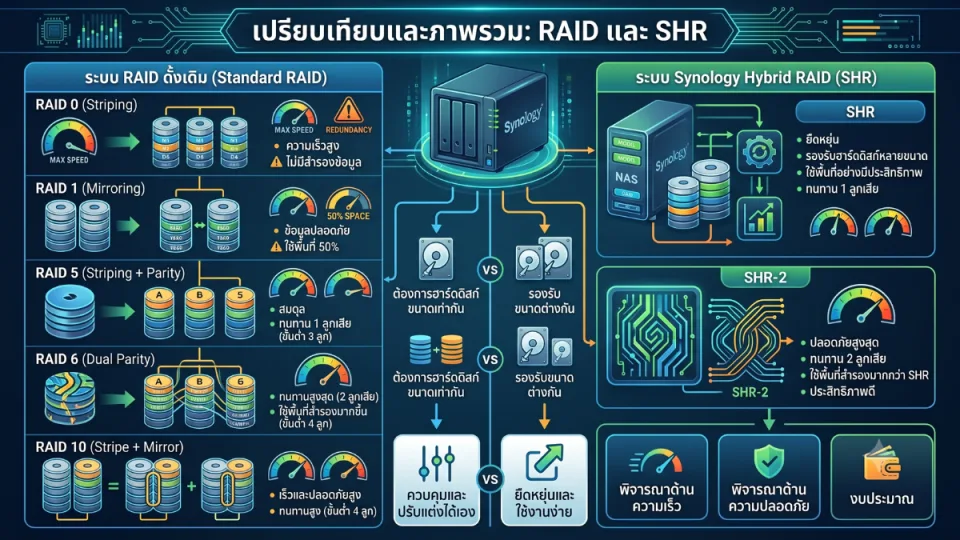
RAID (Redundant Array of Independent Disks) and SHR (Synology Hybrid RAID) are technologies for managing multiple hard drives to work together in a single system, helping to increase performance, flexibility, and data security in storage systems such as NAS (Network Attached Storage).
Both RAID and SHR have different advantages and limitations, depending on the number of hard drives, storage capacity, speed requirements, security, and the user's usage patterns.
What is RAID?
RAID is the combination of multiple hard drives to work in the same format, with the main goals being to increase data read/write speed (Performance) and/or to enhance data safety in case of hard drive failure (Redundancy).
RAID has several types, each suitable for different uses, such as tasks that require high speed, tasks that require security, or systems that need a balance between usable space and data protection.
Common Types of RAID
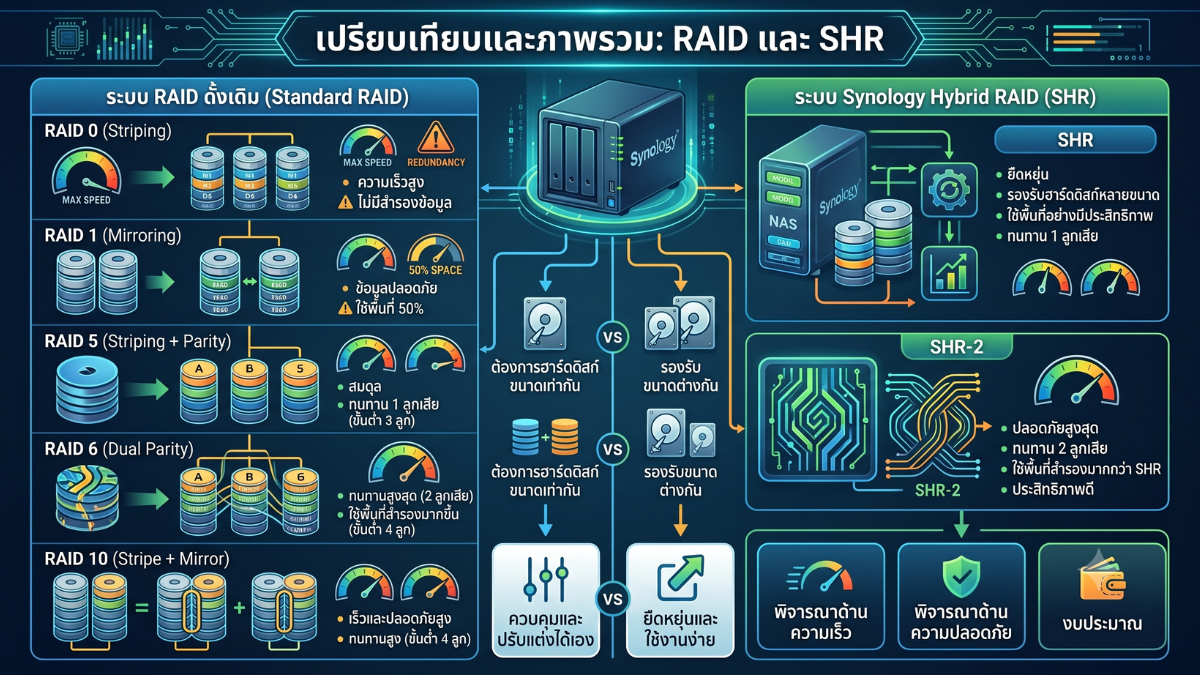
- RAID 0 (Striping)
- Data is divided and spread across multiple hard drives simultaneously
- Helps increase read/write speed
- Suitable for tasks that require high speed, such as video editing or large files
- No data backup; if any hard drive fails, all data may be lost
- RAID 1 (Mirroring)
- Data is duplicated onto 2 hard drives in a mirror configuration
- If one hard drive fails, the other still contains the same data
- Suitable for users who prioritize data security over usable space
- Uses approximately 50% of the total capacity
- RAID 5 (Striping + Parity)
- Requires at least 3 hard drives
- Data is distributed across multiple hard drives with parity created for data recovery
- Can tolerate the failure of 1 hard drive
- Suitable for small to medium-sized businesses that need a balance between capacity, speed, and security
- RAID 6 (Dual Parity)
- Similar to RAID 5 but has 2 sets of Parity
- Can tolerate simultaneous failure of up to 2 hard drives
- Suitable for systems with many hard drives or very important data
- Uses more backup space than RAID 5 and may have slightly lower write performance than RAID 5
- RAID 10 (Stripe + Mirror)
- It is a combination of RAID 0 and RAID 1
- Requires at least 4 hard drives
- Provides both speed and security
- Suitable for tasks that require high performance, such as Databases, Virtualization, or systems that need to read/write large amounts of data
- Uses about 50% of the total capacity
What is SHR (Synology Hybrid RAID)?
SHR or Synology Hybrid RAID is a RAID technology developed by Synology to allow users to manage storage space more easily and flexibly than traditional RAID, especially in cases where hard drives of different sizes are used together.
The highlight of SHR is that the system automatically calculates and allocates space, helping general users or small businesses to use hard disk space more efficiently without needing to understand detailed RAID structures.
Types of SHR
- SHR
- Can withstand the failure of 1 hard disk
- Suitable for general users or small businesses
- Easy to use and more flexible than traditional RAID when using hard disks of different sizes
- Suitable for 2-Bay, 4-Bay NAS, or models where users may expand capacity in the future
- SHR-2
- Can withstand the failure of up to 2 hard disks
- Suitable for NAS with more bays, such as 5-Bay, 6-Bay, 8-Bay or more
- Suitable for important data that require high security
- Uses more reserved space than regular SHR
The Working Principles of RAID and SHR
- RAID: Data will be distributed, backed up, or stored according to the chosen RAID type, such as RAID 0, RAID 1, RAID 5, RAID 6, or RAID 10. It is generally best used when all hard drives are the same size.
- SHR: The system will automatically calculate and manage the storage space. It works better than traditional RAID when using hard drives of different sizes. It is suitable for users who want simplicity and flexibility in expanding storage in the future.
Advantages and Disadvantages of RAID and SHR
| Type | Advantages | Disadvantages |
|---|---|---|
| RAID 0 | High speed, uses the full combined capacity | No data protection, if a hard disk fails, all data may be lost |
| RAID 1 | Data is safe with mirroring, easy to use | Can use about 50% of the total capacity |
| RAID 5 | Balance between space, speed, and security | Requires at least 3 hard drives and can tolerate 1 failure |
| RAID 6 | Safer than RAID 5, can support 2 hard drives failure | Uses more backup space and requires at least 4 hard drives |
| RAID 10 | Fast and highly secure, suitable for heavy workloads | Uses about 50% of the space and requires at least 4 hard drives |
| SHR | Flexible, easy to use, supports hard disks of various sizes well | Primarily suitable for Synology, and may not be suitable for those who want fully customized standard RAID structures |
| SHR-2 | High safety, can support 2 failed hard drives, and more flexible than RAID 6 when using hard drives of different sizes | Uses more backup space than SHR and is suitable for NAS with a sufficient number of bays |
How are RAID and SHR different?
| Topic | RAID | SHR |
|---|---|---|
| Flexibility | Suitable for the same size hard drives | Better support for different sized hard drives |
| Ease of setup | Must understand each type of RAID before choosing to use | The system helps calculate and manage automatically |
| Capacity expansion | May have more limitations when adding hard drives of different sizes | More flexible when adding hard drives in the future |
| Who it is suitable for | Administrators who want to control the storage structure themselves | General users, small businesses, and those who want simplicity |
| Usage on Synology NAS | Supported on many models, depending on the number of bays and NAS model | Is a popular option for many Synology NAS models, especially for general use and SMB |
Should I choose RAID or SHR?
- Select SHR if you want ease of use, have hard disks of different sizes, or plan to add more hard disks in the future
- Choose SHR-2 if using a multi-bay NAS and want to support up to 2 hard drive failures
- Select RAID 1 if using a 2-Bay NAS and want a standard Mirror
- Choose RAID 5 if using 3 or more hard drives of the same size and want a balance between capacity and security
- Choose RAID 6 if you have multiple hard drives and want higher security than just a single drive failure
- Choose RAID 10 if you want both speed and security, and are willing to use about half of the total capacity.
- Avoid RAID 0 for important data because there is no redundancy; if any hard drive fails, all data may be lost
Understanding: RAID and SHR Are Not Backup
The point that many people misunderstand is that RAID or SHR is not a backup system, but a system that allows the NAS to continue functioning when some hard drives fail.
RAID and SHR cannot prevent these issues:
- User deleted the wrong file
- File was modified or overwritten
- Ransomware encrypted the file
- The NAS is completely damaged
- Fire, flood, or power surge
- The device was stolen
Therefore, there should always be an additional backup system, such as backing up to an external drive, another NAS, cloud storage, or using the 3-2-1 backup approach to increase data security.
Summary
RAID and SHR are important technologies for managing storage space on NAS. RAID is suitable for users who want to have clear control over their storage configurations, while SHR is suitable for Synology NAS users who want flexibility, ease of use, and good support for multiple hard drive sizes.
If you are a general user or a small business using Synology NAS, choosing SHR is often the most convenient and cost-effective option. However, for enterprise systems with clearly designed storage, or when using hard drives that are all the same size, traditional RAID such as RAID 5, RAID 6, or RAID 10 is still an appropriate choice.
The most important thing is that whether you choose RAID or SHR, you should always have a separate backup plan, because protecting against hard drive failure is not the same as protecting against data loss from all causes.
Need expert advice or would like to request a quotation? Contact us today:
E-mail: [email protected]
LINE Official: @sync.co.th

The Company reserves the right to correct any typographical or printing errors and shall not be held liable for any inaccuracies resulting from such errors.
*** This article is the intellectual property of SyncTech Solution Company Limited. Reproduction, modification, or redistribution of this content, in whole or in part, is strictly prohibited without prior written permission from the Company. ***