What is Agentic AI? From Chatbots to AI Agents that can actually work on behalf of humans
In today's business world, we are moving beyond the limitations of traditional AI that can only "answer questions" into an era where AI can "help plan," "use tools," "connect systems," and "perform multi-step tasks" according to human-defined goals. This is the beginning of Agentic AI or AI Agent, a technology akin to a digital employee that can assist around the clock.
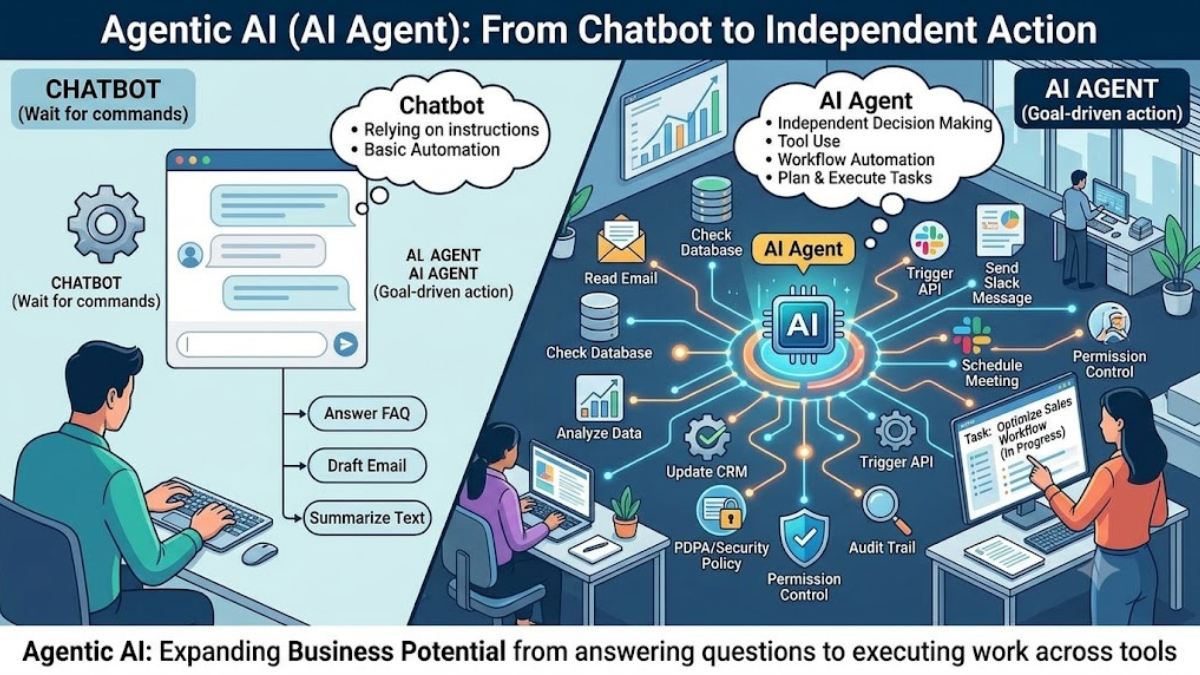
If a Chatbot is an assistant that waits for us to type and ask questions one by one, an AI Agent is an assistant that can take on big goals and break them down into steps, such as reading emails, checking information in the system, summarizing reports, sending notifications, or creating follow-up tasks for the team, while still remaining under the conditions, permissions, and audits set by the organization.
1. Introduction: When Chatting Alone Starts to Be Not Enough for Business
Imagine a Monday morning when you turn on your computer and find that customer meeting emails have been neatly organized, last week's sales data has been summarized into a report, along with trend analysis, and sent to the management team, all before you even start working yourself.
In the past, we were familiar with using AI in the form of Chatbots or Generative AI that waits for us to input commands, and then the AI responds with text, images, or information that we have to use ourselves. For example, asking AI to summarize a report, and then we have to put it into Excel, send emails, notify the team, or update the system by ourselves.
Agentic AI comes in to reduce this gap because it does not stop at just "responding," but can help "continue the work" more, such as receiving information, checking conditions, selecting appropriate tools, generating results, and passing them on to other systems according to the specified workflow.
However, AI agents should not be allowed to do everything without supervision. Tasks related to money, personal information, security, or critical decisions should always be checked or approved by humans first.
2. What is Agentic AI?
Agentic AI is an AI system with capabilities in the form of an "agent." It can receive goals, plan, break tasks into steps, use tools, and adjust its actions based on the outcomes encountered, in order to help complete missions.
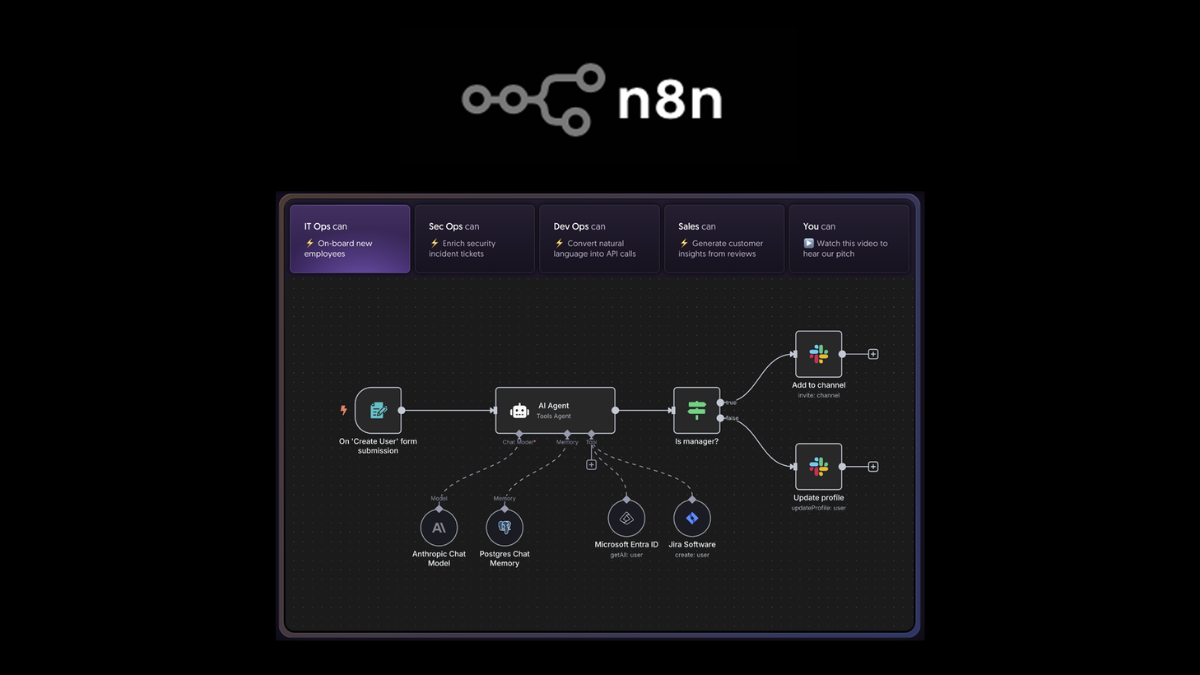
The highlight of AI Agent is its ability to connect with external tools such as Email, Calendar, CRM, Database, Spreadsheet, API, Ticketing System, Cloud Storage, ERP, or automation systems like n8n to perform tasks beyond just replying to messages in the chat interface.
For example, instead of just asking AI to 'help write an email to a customer,' the AI Agent might do more, such as pulling customer information from the CRM, checking purchase history, drafting the email, scheduling it in the calendar, and creating a follow-up task for the sales team.
3. How is a Chatbot different from an AI Agent?
| Features | General Chatbot / Generative AI | Agentic AI / AI Agent |
|---|---|---|
| Role | Answer questions or create content | Assist in carrying out tasks according to goals |
| Work style | Wait for step-by-step instructions | Receive a goal, then plan it in multiple steps |
| Using tools | Mostly works on the chat page | Can connect to Email, API, Database, CRM, Calendar, or other systems |
| Decision | Follow the specified instructions | Choose the next step according to the given conditions |
| Result | Text, Image, Code, or Recommendation | Tasks that have been carried out, such as creating reports, sending notifications, opening Tickets, or scheduling appointments |
| Risk | Incorrect answers or inaccurate information | If permissions are not set properly, it may cause system malfunction or affect real data |
| Controls that should be in place | Check answers before use | Must have Permission, Logging, Human Approval, and clear Policy |
4. How does an AI Agent work?
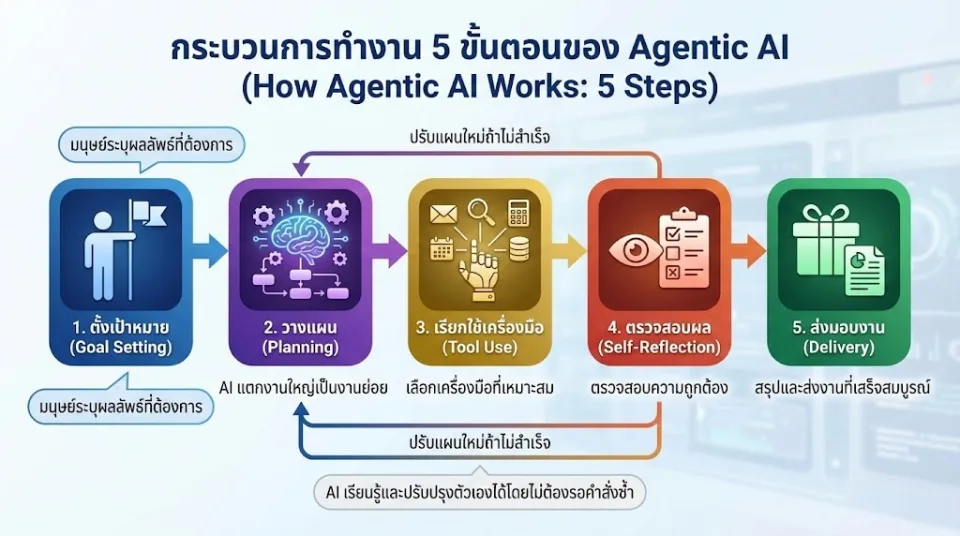
To make it easy to understand, an AI Agent often operates as a cycle consisting of receiving goals, planning, using tools, checking results, and delivering tasks.
- Goal Setting: Humans set goals, such as “Summarize the weekly sales report and send it to management.”
- Planning: AI breaks down big tasks into smaller tasks, such as extracting sales data, analyzing total sales, finding best-selling products, and summarizing insights.
- Tool Use: AI uses tools, such as Database, Google Sheets, Email, CRM, API, or Automation systems.
- Reasoning and Checking: AI checks results, for example, whether the data is complete or if there are any abnormal numbers.
- Human Approval: For important tasks, it should be sent to a human for review before final submission.
- Delivery: Send the report, open a Ticket to notify the team, or update the system according to the Workflow.
The key point is that an AI Agent should not have more privileges than necessary. For example, an agent responsible for summarizing sales should be able to read data, but should not have the right to delete information or modify accounting entries unless approved by the responsible person.
5. Main Components of the AI Agent System in an Organization
1. AI Model
It is the brain of the system, used to understand commands, analyze data, summarize results, and decide what step to take next.
2. Tools or Connectors
It is a tool that AI uses to work in practice, such as Email, Calendar, CRM, ERP, Database, Google Sheets, Microsoft 365, Slack, LINE, Telegram, API, or automation systems like n8n
3. Memory and Knowledge Base
Used to store organizational context and knowledge, such as product manuals, FAQs, policy documents, customer databases, or internal information that AI needs to use for responding or working.
4. Workflow Engine
Used to specify workflow steps, for example, if the documents are correct, forward them to accounting; if the information is incomplete, notify the staff; or if the sales are abnormal, notify the manager.
5. Permission and Access Control
Used to control which information an AI Agent can access and what actions it can perform, such as being able to read, write, send emails, or only perform actions after human approval.
6. Logging and Audit Trail
It is necessary to record what the AI does, when, what data it uses, and who instructed it, in order to allow for retrospective verification in case of errors.
6. Examples of Using AI Agents in Business
1. Customer Support Agent
An AI agent for customer service is not just for answering FAQs but can also check parcel status, open tickets to notify the relevant department, or forward to a staff member when the question is complex.
Examples of work that can be done:
- Answer customer questions from the product database
- Check order status
- Create a ticket when a problem is found
- Notify the sales team or support team
- Escalate to a human when special conditions are found
2. Sales Development Agent
An AI agent can help the sales team find customer information, analyze purchase history, create follow-up emails, and alert when it's time to follow up.
- Segment customers according to the purchase opportunity
- Create personalized emails
- Follow up on leads that have not responded
- Create a summary before meeting with clients
3. Accounting Agent
An AI agent for accounting tasks can help read documents, check for completeness, and prepare data for entry into the accounting system, but a human should review it before the actual recording.
- Read invoices, tax invoices, or purchase orders
- Extract document number, date, amount, and company name
- Check for duplicate documents
- Notify when information is incomplete
- Prepare data for importing into accounting software
4. HR Recruitment Agent
The AI Agent can help with initial Resume screening against the Job Description and schedule interviews according to the availability of both the candidates and the team.
- Read the resume and summarize the candidate's strengths
- Compare qualifications with the job position
- Rank candidates initially
- Draft an interview invitation email
- Send information to HR for review before actual contact
5. IT Support Agent
An AI Agent for the IT department can help answer employee questions, create manuals, perform initial log checks, and send alerts when there are system issues.
- Answer questions about how to connect VPN or Wi-Fi
- Create a manual for new employees
- Summarize recurring Tickets
- Notify backup failures
- Perform preliminary log analysis before sending to IT for review
6. Meeting and Follow-up Agent
AI Agents can help summarize meetings, extract Action Items, and create Tasks for the team in management systems such as Trello, Asana, ClickUp, or Microsoft Planner
- Summarize key points from the meeting transcript
- Separate tasks according to responsible person
- Set due date
- Send summary to meeting participants
- Follow up on unfinished tasks
7. Market Research Agent
An AI agent can help track competitor information, prices, promotions, news, or market trends and then summarize them into a report for the management team.
- Extract data from specified websites or sources
- Compare prices and promotions
- Summarize market trends
- Send notifications when significant changes are detected
8. Social Media Agent
AI Agents can help plan content, write captions, generate post ideas, and schedule publication, but the marketing team should still review before the actual posting.
- Set up a Content Calendar
- Write captions in various styles
- Summarize Engagement results
- Suggest additional topics to create
9. Data Analyst Agent
The AI Agent can connect to Google Analytics, databases, Excel, or BI dashboards to help summarize data and identify anomalies that should be investigated.
- Weekly sales summary
- Analyze best-selling products and low-profit products
- Detect abnormal sales
- Create insights for executives
10. Personal Executive Agent
For executives or business owners, AI agents can help schedule appointments, remind about important tasks, or prepare information before meetings.
- Summarize daily work schedule
- Prepare brief before meeting
- Remind follow-up with clients
- Draft reply email
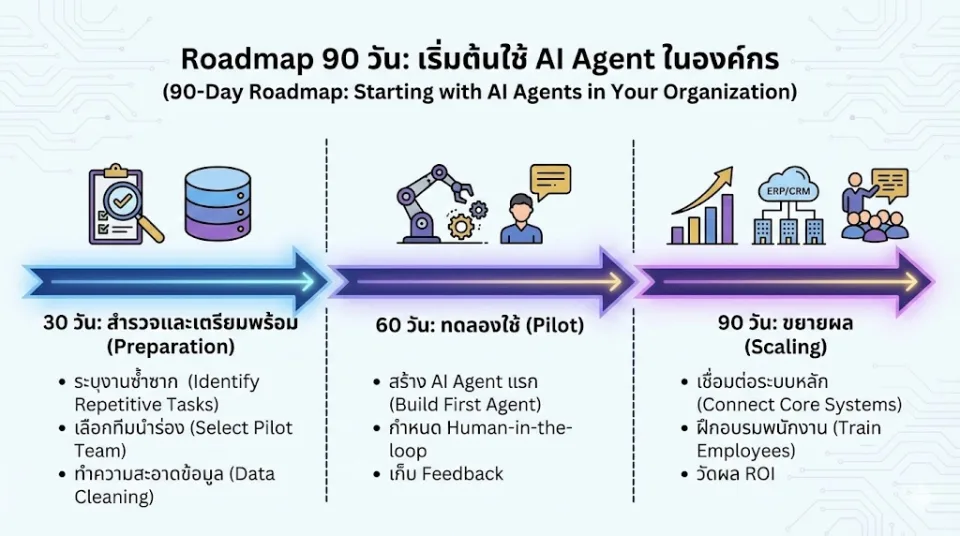
7. 90-Day Roadmap for Implementing AI Agents in an Organization
| Time Period | What to Do | Expected Results |
|---|---|---|
| Day 1-30 | Explore repetitive tasks, select low-risk Use Cases that show quick results | Obtain 1-2 AI Agent tasks to start testing |
| Day 31-60 | Create a Pilot Agent, connect data as necessary, and define Human-in-the-loop | Have a prototype system that assists real tasks but is still monitored by humans |
| Day 61-90 | Measure results, adjust permissions, modify workflow, train the team, and decide whether to scale up | Know ROI, risks, and a plan to expand to other departments |
8. Checklist on Security, Data, and PDPA
Before allowing an AI Agent to connect with real systems, organizations should clearly establish rules regarding data and security, especially personal data in accordance with the PDPA law.
- Data Privacy: Check whether the data sent to AI contains personal or confidential information
- Access Control: Restrict the AI Agent's permissions to access only the necessary information
- Least Privilege: Do not give AI more access than the tasks it needs to perform
- Human Approval: Important tasks, such as sending emails to customers, approving funds, or editing information, should be approved by a person first
- Logging: Record what the AI does, what data it uses, and who issued the command
- PDPA: If using customer data, you should check the purpose, consent, and privacy policy
- Data Retention: Specify the duration for which the data used by AI is retained
- Vendor Review: Check the conditions of the AI provider to see whether they use the data to train models or not
9. Risks of AI Agents That Organizations Should Know
AI Agents have more capabilities than Chatbots, so they also carry greater risks, especially when connected to real systems such as Email, CRM, Database, Payment, or internal organizational systems.
- Prompt Injection: Someone inserts hidden commands to trick AI into doing things it shouldn't do
- Excessive Agency: Giving AI too much authority so that it operates beyond its boundaries
- Data Leakage: AI might disclose information that should not be sent out
- Tool Misuse: AI uses tools incorrectly, such as sending emails to the wrong person or updating the wrong system
- Hallucination: AI generates information that seems credible but is incorrect
- Supply Chain Risk: Plugins, connectors, or external models may pose risks
The way to reduce risk is to start with low-impact tasks, clearly limit permissions, use a human approval system, and regularly check logs.
10. Measuring the Success of AI Agents
The use of AI Agents should be measured concretely in order to determine whether the project is worthwhile or which areas need improvement.
| Indicator | Meaning | Example of Measurement |
|---|---|---|
| Time Saved | Time Saved | Reduce report summarizing time from 3 hours to 15 minutes |
| Cost per Task | Cost per task | Reduce repetitive labor costs or reduce outsourcing costs |
| Error Rate | Work Errors | Reduce incorrect data entry or reduce document omissions |
| Response Time | Response Speed | Can respond to customers in a few seconds instead of waiting for hours |
| Employee Satisfaction | Employee satisfaction | Employees reduce boring work and have more time for valuable work |
| Human Review Rate | The proportion of work that requires human review | Used to assess whether the Agent is ready to scale up |
11. Example Prompts for Starting to Use an AI Agent
These prompts can be used as a starting point with ChatGPT, Claude, or internal AI Agent systems within an organization, and should be adjusted to fit the actual business information.
Documentation and Reporting Section
- Summarize this meeting report point by point, specifying who needs to do what next, and set the deadlines.
- Review this document and summarize the points that the manager should check before sending it to the client.
- Convert the raw data in this document into a table ready to be used in the monthly report.
Customer Relations and Sales Category
- Draft an email replying to a customer who complained about delayed products, using polite language and offering a solution.
- Analyze this customer's purchase history and recommend products that should be offered additionally.
- Create a simulated conversation for a sales team that needs to explain IT solutions to non-technical executives.
Marketing and Content Category
- Write 5 Facebook caption styles for this month's promotion, focusing on SME business owners.
- Create an SEO article outline for NAS products suitable for photographers and video teams.
- Summarize last month's customer reviews, including what customers liked and what they want improved.
IT and Operation Section
- Write a manual for new employees about connecting to the VPN and using the company's shared files.
- Summarize the tickets that recurred this month and suggest ways to reduce problems in the future.
- Check this set of logs and summarize any abnormal events that IT should further investigate.
Administration Section
- Schedule AI learning for business owners, using 30 minutes per day for 2 weeks
- Help summarize information comparing 3 vendors and create a pros and cons table
- Create a checklist before starting an AI Agent project in the sales department
12. Do & Don't in Using AI Agents
Should Do
- Start with small tasks that have low risk and show quick results
- Clearly define the permissions of the AI Agent
- Record logs of all AI activities
- Have humans review important tasks before final output
- Choose tools with data and security policies suitable for the organization
- Train employees to understand both the benefits and limitations of AI
Should not do
- AI should not have the right to delete, modify, or transmit important information without approval
- Confidential company information should not be entered into public AI without supporting policies
- AI results should not be fully trusted 100% without verification
- High-risk tasks, such as finance, legal, or health information, should not be started first
- AI Agents should not be used without a clear system owner or responsible party
13. FAQ: Frequently Asked Questions about AI Agent
Will AI Agents Take Human Jobs?
AI Agents often help reduce repetitive work, paperwork, and time-consuming tasks so that people have more time to do work that requires thinking, decision-making, and customer relationships. However, employees need to learn how to work with AI.
Do you need to know how to program to use an AI Agent?
Not necessary in every case, because there are currently many No-code and Low-code tools. However, if you need to connect internal systems such as Database, API, ERP, or CRM, you may need an IT team or experts to help design it.
Is an AI Agent expensive?
There are options ranging from budget-friendly tools to enterprise-level systems. Costs depend on the number of tasks, data volume, the models used, and the required level of security. Businesses should start with a small pilot before making significant investments.
Can an AI Agent provide incorrect or misleading information?
Opportunities can arise, so it is advisable to use references from reliable sources and there should be a grounding system, such as having AI reference a Knowledge Base, Database, or internal organizational documents instead of responding solely from the model's memory.
Should SMEs start using AI Agents?
You should start with small tasks that immediately save time, such as responding to customers, summarizing reports, reading documents, or sending repetitive task reminders, because SMEs often have limited staff and need to increase efficiency without significantly raising costs.
Is it safe to use an AI Agent for accounting work?
It can be used if designed carefully, for example, by restricting permissions to document reading or data preparation, and having humans review it before saving to the actual system, as well as taking into account personal and financial information.
Summary
Agentic AI or AI Agent is the next step of AI usage in organizations. From previously having AI just answer questions, it has evolved into a system that can assist in executing multiple steps under specified goals, conditions, and permissions.
The highlight of AI Agents is their ability to connect with real systems such as Email, Calendar, CRM, Database, API, and Workflow Automation to help businesses reduce repetitive tasks, increase speed, and create more systematic workflows.
However, an AI Agent must come with good controls, such as Permission, Logging, Human-in-the-loop, PDPA, Data Privacy, and Security Policy, because the more an AI can do, the more risks need to be carefully managed.
The first step a business can take immediately is to list the three most repetitive tasks in the organization. Choose the task with the lowest risk to do a pilot and consult experts to design an AI Agent system that connects safely with the company's data and systems.
Need expert advice or would like to request a quotation? Contact us today:
E-mail: [email protected]
LINE Official: @sync.co.th

The Company reserves the right to correct any typographical or printing errors and shall not be held liable for any inaccuracies resulting from such errors.
*** This article is the intellectual property of SyncTech Solution Company Limited. Reproduction, modification, or redistribution of this content, in whole or in part, is strictly prohibited without prior written permission from the Company. ***