Wi-Fi 7 or the IEEE 802.11be standard is a new Wi-Fi standard that is being increasingly talked about in 2026, especially among organizations, offices, hotels, factories, warehouses, schools, restaurants, and businesses that need to support a large number of devices simultaneously.
The highlights of Wi-Fi 7 are not just "higher speeds" but also include reduced latency, simultaneous use of multiple frequency bands, improved interference management, and the use of the 6GHz band for tasks that require high bandwidth and low latency.
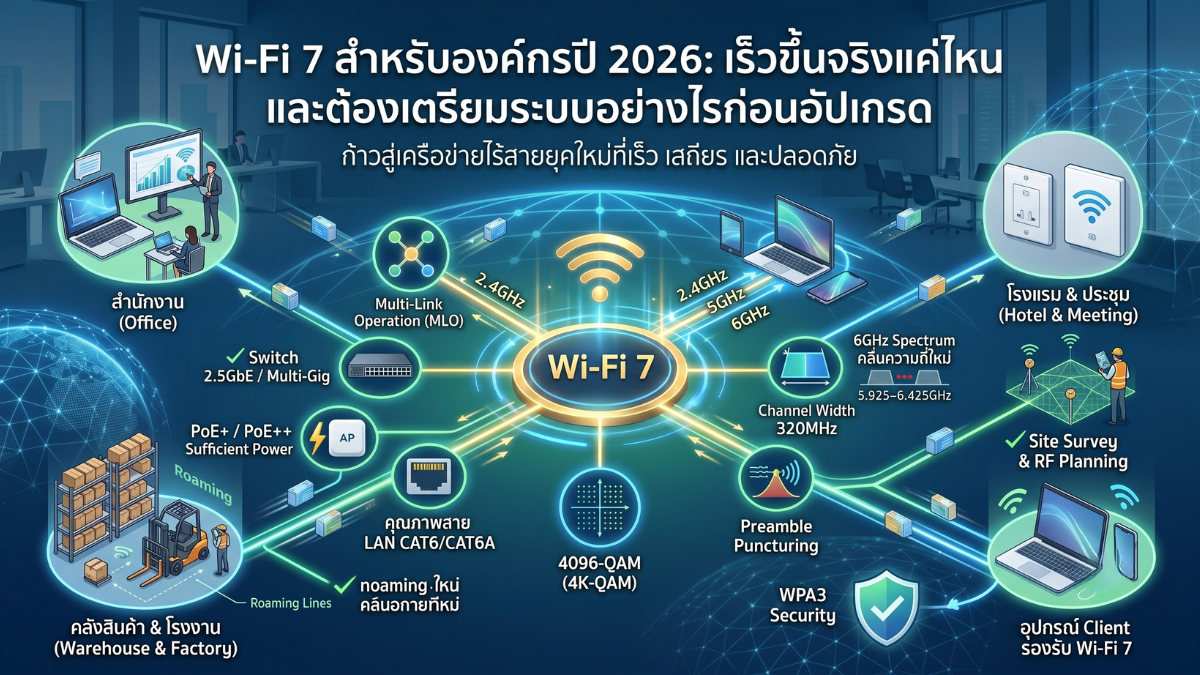
However, upgrading to Wi-Fi 7 does not mean that everything will instantly become faster just by changing the Access Point, because the actual performance depends on several factors, such as whether the client supports it, whether the switch is 2.5GbE, whether PoE is sufficient, whether the LAN cable is supported, and whether a proper Site Survey / RF Planning has been conducted.
What is Wi-Fi 7?
Wi-Fi 7 is a new Wi-Fi standard that builds upon Wi-Fi 6 and Wi-Fi 6E, designed to support high-speed usage, low latency, and connectivity for a large number of devices, such as high-resolution video conferencing, cloud applications, AR/VR, POS systems, smart offices, IoT, AI cameras, and organizational tasks that involve large amounts of data transfer.
The key features of Wi-Fi 7 include Multi-Link Operation (MLO), Maximum Channel Width of 320MHz, 4096-QAM or 4K-QAM, Multi-RU, Preamble Puncturing, and compatibility with the 6GHz frequency band in countries where its use is permitted
Why is Wi-Fi 7 starting to become the new standard for organizations?
In the early stages of Wi-Fi 7, there is still a gap between the Access Point side and the Client side because even though APs are beginning to support Wi-Fi 7, endpoint devices such as Notebooks, Smartphones, Tablets, and IoT devices are still not numerous.
But as we enter 2026, new client devices are increasingly supporting Wi-Fi 7, especially new notebooks, mid-to-high-end smartphones, and enterprise devices, leading administrators to start considering Wi-Fi 7 as the primary option for new installation projects or wireless system upgrade projects.
For organizations planning to invest in a new Wi-Fi system, choosing Wi-Fi 7 from the start may help the system support usage better for many years to come, especially in areas with dense devices or plans to use applications that require low latency and high bandwidth.
Key Features of Wi-Fi 7
1. Multi-Link Operation (MLO)
MLO or Multi-Link Operation is one of the most important features of Wi-Fi 7, allowing Client devices to use multiple Links or frequency bands simultaneously, such as 2.4GHz, 5GHz, and 6GHz, depending on the capabilities of the AP and Client.
The simple concept is that instead of a device sticking to a single band and having to switch back and forth, Wi-Fi 7 can use multiple paths to increase throughput, reduce latency, or improve connection stability.
However, the performance of MLO depends on both the Access Point and the Client. If the Client does not yet support MLO or the Driver/Firmware is not fully developed, the actual results may not be at full performance. In some environments that require high stability, administrators may need to test before launching it for actual use.
2. 6GHz Spectrum
The 6GHz frequency band is a new area that helps reduce congestion from 2.4GHz and 5GHz, especially in offices, hotels, or areas with a large number of APs.
The highlight of 6GHz is that it has cleaner and wider channels, suitable for tasks that require high throughput, such as new-generation notebooks, video conferences, AR/VR, graphic work, cloud applications, and devices that need low latency.
For Thailand, data from the NBTC indicates the use of the 6GHz band in the range of 5.925–6.425GHz, or approximately 500MHz. Therefore, designing Wi-Fi 7 in Thailand should check NBTC regulations, device models, Region Code, and Firmware to match actual usage.
3. Maximum Channel Width 320MHz
Wi-Fi 7 supports a maximum channel width of 320MHz on the 6GHz band, which is wider than Wi-Fi 6 that supports up to 160MHz, allowing more data to be transmitted at the same time.
However, in organizational work, 320MHz should not be enabled at every point without planning because very wide channels consume a lot of frequency resources. If there are multiple APs close to each other, it can easily cause co-channel interference or overlap between APs.
For areas with dense APs, such as multi-story offices, hotels, schools, or large buildings, it may be necessary to choose 80MHz, 160MHz, or 320MHz depending on the number of APs and the actual number of clients.
4. 4096-QAM or 4K-QAM
4096-QAM or 4K-QAM increases the data density transmitted per symbol compared to 1024-QAM in Wi-Fi 6, resulting in a higher data rate when the signal conditions are good.
What should be understood is that 4K-QAM will show clear benefits when the client is close to the AP, the signal is strong, the noise is low, and the environment is of good quality. If the signal is weak or there is high interference, the system may automatically reduce the modulation, resulting in actual speeds lower than the specifications.
5. Preamble Puncturing
Preamble Puncturing allows Wi-Fi 7 to use wider channels more flexibly. If part of a channel has interference, the system can avoid only the problematic part while continuing to use the other parts of the channel.
This feature helps reduce the problem that in the past, when there was interference in certain periods, the channel width had to be reduced for the entire batch, improving performance in areas with dense signals.
6. WPA3 and Security on 6GHz
Using Wi-Fi on the 6GHz band requires higher security standards than before. Generally, WPA3 or security formats that comply with the standards and device requirements must be used.
Therefore, older devices that only support WPA2 will not be able to use SSIDs on 6GHz. Organizations should separate SSIDs and VLANs for older devices, such as printers, barcode scanners, or IoT devices that still only support 2.4GHz/5GHz and WPA2.
TP-Link Omada Wi-Fi 7 for Organizations
TP-Link Omada is a network solution for businesses that integrates Access Points, Switches, Gateways, and Controllers into a single management system. It is suitable for organizations that want to centrally manage multiple Wi-Fi locations, such as offices, hotels, restaurants, schools, and multi-branch businesses.
Omada Wi-Fi 7 comes in multiple models to choose from, ranging from the cost-effective Dual-Band model for upgrading 2.4GHz/5GHz, to the Tri-Band model that supports 6GHz for tasks that require the full capabilities of Wi-Fi 7
Interesting Omada Wi-Fi 7 Models
| Model | Type | Highlights | Suitable for |
|---|---|---|---|
| EAP723 | Ceiling Mount Dual-Band Wi-Fi 7 | Supports 2.4GHz and 5GHz, has 2.5GbE port, supports PoE+ depending on model | Offices, stores, or areas that need Wi-Fi 7 cost-effectively but do not yet require 6GHz |
| EAP772 | Ceiling Mount Tri-Band Wi-Fi 7 | Supports 2.4GHz, 5GHz, 6GHz, 320MHz, MLO, and 2.5GbE port | Organizations that need full-performance Wi-Fi 7 and have new clients supporting 6GHz |
| EAP725-Wall | Wall Plate Dual-Band Wi-Fi 7 | Wall-mounted, has 2.5GbE port and downlink port for wired devices | Hotels, meeting rooms, guest rooms, branch offices, or areas that require a Wall Plate AP |
Note: Model names, total speed, and certain features may vary by region, such as US/EU/TH, and hardware version. You should check the latest datasheet and firmware before quoting and actual installation.
Reality Check: Things to Check Before Upgrading to Wi-Fi 7
1. The switch must support Multi-Gigabit
Many Wi-Fi 7 access points come with a 2.5GbE port. If connected to an existing switch that only has 1GbE, the AP's uplink port may immediately become a bottleneck, even though the wireless signal supports high speeds.
For new installations, consider switches with 2.5GbE ports and at least 10GbE uplinks at points that aggregate multiple APs, especially in buildings with dense users or multiple Wi-Fi 7 APs.
2. PoE must supply sufficient power
AP Wi-Fi 7 often requires more power than older AP models, especially those with multiple radios and support for 6GHz. Therefore, it is advisable to check whether the switch supports PoE+ or PoE++ as required by the AP.
If PoE is insufficient, the AP may fail to boot or operate in a reduced performance mode, such as turning off some radios, lowering output power, or limiting certain features.
3. The LAN cable must be of good quality
Although 2.5GbE can operate on high-quality CAT5e cables in many cases, if the cable is old, has poor terminations, or runs over a long distance, it may cause an unstable link.
For new installations, it is recommended to use at least CAT6 cables, and if future-proofing for 10GbE or Backbone is desired, CAT6A should be considered according to budget and distance.
4. Need to redo RF Planning
The 6GHz wave has a shorter coverage range and penetrates walls less than 5GHz and 2.4GHz. Therefore, placing APs in the same way as used for Wi-Fi 5 or Wi-Fi 6 may not be suitable for designing Wi-Fi 7 that intends to use 6GHz seriously.
The installer should conduct a site survey, check wall materials, ceiling height, number of users, AP density, and actual usage before determining the number and location of APs.
5. The client must support Wi-Fi 7
Installing a Wi-Fi 7 AP does not automatically make all devices Wi-Fi 7. If a notebook, smartphone, or endpoint device only supports Wi-Fi 5 or Wi-Fi 6, it will operate according to the capabilities of that client.
Therefore, before investing, it is advisable to survey what percentage of clients in the organization have Wi-Fi 7 and when there is a plan to upgrade endpoint devices.
6. Legacy equipment must have a separate plan
Older devices, such as printers, scanners, IoT devices, scales, POS machines, or certain cameras, may only support 2.4GHz or WPA2. They should not be mixed with the main SSID that uses WPA3 or 6GHz.
The appropriate approach is to create separate SSID and VLAN for legacy devices and set Firewall Policy to restrict access only to the necessary systems.
7. MLO should be tested before actual use
Although MLO is a prominent feature of Wi-Fi 7, in real-world applications it should be tested with the actual client models used, especially in organizations that require high stability, such as POS, warehouse scanners, medical devices, or devices connected to critical business systems.
If you experience unstable connections, disconnections, or abnormal operation, you may consider temporarily disabling MLO on certain SSIDs to prioritize stability over maximum speed.
Example of Wi-Fi 7 Design for Organizations
General office 20-50 people
- Use AP Wi-Fi 7 Dual-Band such as EAP723 in the main office area
- Use at least 2.5GbE PoE+ Switch for APs
- Separate SSIDs for Staff and Guests
- Use VLANs to separate Office, Guest, and IoT devices
- No need to use 6GHz yet if most Clients do not support it
Offices or organizations with a large number of new-generation clients
- Use a Tri-Band AP such as EAP772 to enable 6GHz
- Use a 2.5GbE PoE+ switch with a 10GbE uplink
- Design channel widths of 80/160/320MHz according to AP density
- Enable WPA3 for SSIDs using 6GHz
- Test MLO with real clients before full deployment
Hotel or Meeting Room
- Use a Wall Plate AP such as EAP725-Wall or a model suitable for the number of devices in the room
- Use the Downlink port for IP Phones, Smart TVs, or wired devices
- Design VLANs to separate Guest, Staff, and Management
- Control the bandwidth of Guest Wi-Fi
- Plan AP placement per room or group of rooms based on wall materials and actual usage
Warehouse and Factory
- Survey the actual area before installation, because metal structures, product shelves, and machinery have a significant impact on the signal.
- Focus on stability rather than maximum speed if using a Barcode Scanner or Handheld Terminal.
- Separate VLANs for Office, Scanner, IoT, CCTV, and Guest.
- Test roaming between APs along the actual walking paths.
- It may still be necessary to use 2.4GHz/5GHz for certain industrial devices.
Checklist before submitting a Wi-Fi 7 quote
- Check the actual number of concurrent users
- Check the number of clients that support Wi-Fi 7 and 6GHz
- Check whether the existing switch supports 2.5GbE
- Check the PoE budget of the switch
- Check whether the existing LAN cables are CAT5e/CAT6/CAT6A and in good condition
- Conduct a site survey or review the floor plan
- Plan VLANs and SSIDs
- Set security policies such as WPA2/WPA3, guest isolation, and captive portal
- Check 6GHz regulations according to the country and device model
- Choose APs suitable for the area, not just based on maximum speed numbers
Summary
Wi-Fi 7 is a technology that clearly enhances an organization's wireless network, especially in terms of speed, latency, the ability to support a large number of devices, and the use of the 6GHz band for new generation clients.
But upgrading to Wi-Fi 7 requires looking at the entire system, not just the Access Point. Because if the Switch is still 1GbE, PoE is insufficient, old LAN cables, Clients are not yet supported, or there is no RF Planning, the actual results may not be much different from before.
For organizations planning a new system in 2026, choosing TP-Link Omada Wi-Fi 7 is an interesting option, as there are multiple models to choose from, ranging from cost-effective Dual-Band to Tri-Band that supports 6GHz and can be centrally managed via Omada Controller.
If designed correctly, Wi-Fi 7 will not just be a speed upgrade, but a preparation of wireless network infrastructure to be ready for modern operations in the long term.
Need expert advice or would like to request a quotation? Contact us today:
E-mail: [email protected]
LINE Official: @sync.co.th

The Company reserves the right to correct any typographical or printing errors and shall not be held liable for any inaccuracies resulting from such errors.
*** This article is the intellectual property of SyncTech Solution Company Limited. Reproduction, modification, or redistribution of this content, in whole or in part, is strictly prohibited without prior written permission from the Company. ***