Quick answer: SHA-256 is a cryptographic hash algorithm that produces a 256-bit fingerprint of data. It helps check whether a downloaded file, document or backup matches a trusted reference. It does not encrypt files, prove that a download is malware-free, or provide suitable password storage by itself.
What is SHA-256?
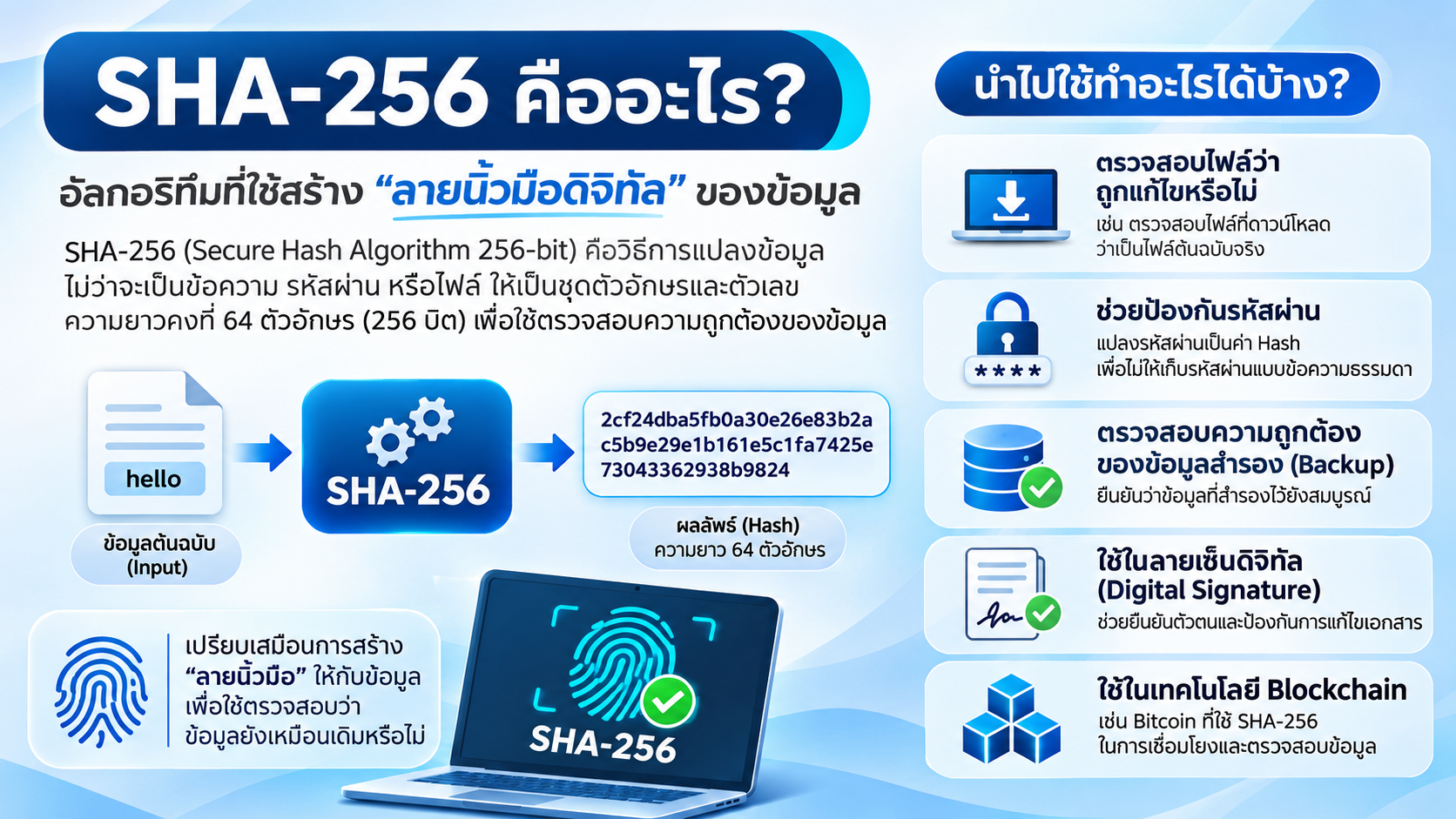
SHA-256 belongs to the SHA-2 family. Its output is always 256 bits, or 32 bytes, commonly displayed as 64 hexadecimal characters. A hexadecimal character represents four bits. The result is often called a hash, digest or checksum. See the NIST Secure Hash Standard.
For the five-byte text hello, with no trailing space or newline, the SHA-256 digest is:
2cf24dba5fb0a30e26e83b2ac5b9e29e1b161e5c1fa7425e73043362938b9824The same bytes produce the same digest. Changing hello to Hello typically changes many output bits, a property known as the avalanche effect. Spaces, line endings and text encoding matter because SHA-256 processes bytes. Renaming a file alone does not change its contents or digest.
Hashing and encryption: what is the difference?
| Question | SHA-256 hashing | AES-256 encryption |
|---|---|---|
| Main purpose | Create a fingerprint for comparison | Protect the confidentiality of data |
| Recover the original? | No decryption operation | Yes, with the correct key |
| Meaning of 256 | Digest length in bits | Key length in bits |
A hash is not a compressed copy of a file. You cannot reconstruct a document from its SHA-256 value. However, an attacker can try likely inputs and compare their digests, which matters particularly for weak passwords.
Where is SHA-256 useful?
Checking downloads
Calculate a download's digest and compare it with the SHA-256 checksum published by its vendor for that exact version and platform. A mismatch means the bytes differ. Possible causes include an incomplete download, corruption, the wrong release or tampering.
A matching checksum does not prove that a file is safe. Obtain the reference through a trusted channel. If an attacker replaces both a file and its checksum, comparing them alone will not expose the substitution. A signed checksum, verified using the publisher's trusted public key, adds authenticity checking. Debian's verification guide explains this distinction.
Checking backups and data transfers
Comparing source and destination digests helps detect changes when copying files between a server, NAS and cloud storage. Use a stable source: for a live database, create an application-consistent backup or snapshot first. A database file changing during copying cannot serve as a reliable reference.
Checksum comparison complements backup monitoring and restore testing. Matching bytes do not establish that a database can start, an application can recover, or every required file was included.
Digital signatures and blockchain
Digital signature schemes can use SHA-256 as part of signing and verification. The signature and trust in the signer's key provide authentication; a standalone hash does not identify its author.
Bitcoin uses SHA-256-based hashing for block headers and proof of work. Linking blocks through hashes helps make changes detectable, while consensus rules and accumulated work contribute to security. See the Bitcoin developer guide.
How to check SHA-256 on your computer
Replace the example path with your downloaded file's actual location. These commands calculate a digest locally; you do not need to upload the file to an online checker.
Windows: PowerShell
Get-FileHash -LiteralPath 'C:\Downloads\example.zip' -Algorithm SHA256Compare the complete value in the Hash column. See Microsoft's Get-FileHash documentation.
macOS: Terminal
shasum -a 256 "$HOME/Downloads/example.zip"Specify -a 256: shasum otherwise defaults to SHA-1. See the shasum documentation.
Linux: Terminal
sha256sum 'example.zip'Run this from the file's directory, or provide its full path. See the GNU SHA-2 utilities documentation.
What should you do if the checksum differs?
- Do not run the installer until the discrepancy is resolved.
- Check the algorithm, file version, platform and reference checksum.
- Download a fresh copy from the official publisher and compare again.
- If it still differs, contact the publisher through its official support channel.
Compare all 64 hexadecimal characters. Uppercase and lowercase hexadecimal letters represent the same value.
Why plain SHA-256 is unsuitable for passwords
SHA-256 is fast, making large numbers of password guesses inexpensive. Adding a salt does not turn it into a purpose-built password hashing algorithm. OWASP recommends Argon2id first, scrypt when Argon2id is unavailable, and bcrypt for legacy systems. Use a unique salt and appropriately configured work factors through a maintained authentication library.
Frequently asked questions about SHA-256
Can SHA-256 be decrypted?
No. It has no decryption operation. Predictable inputs may still be discovered by guessing and comparing hashes.
Does a matching SHA-256 mean there are no viruses?
No. It shows agreement with the reference checksum. Malware checking and a trustworthy download source remain separate requirements.
Will renaming a file change its SHA-256?
No, if its contents stay unchanged. Editing or re-saving the file may change its bytes and digest.
Can two different files share a hash?
Yes, collisions are mathematically possible because the output has a fixed length. SHA-256 is designed to make finding such collisions computationally difficult; a hash is not a mathematical guarantee of uniqueness.
Does checking a backup's hash replace a restore test?
No. A hash comparison checks agreement between bytes. A restore test checks whether the backup can recover the data and application you need.
Applying this to your organisation
Use trusted reference checksums for downloads, verify transferred data, protect backup manifests from modification and test recovery regularly. For further planning, read about snapshots and the 3-2-1 backup approach and ransomware protection for Synology NAS.
Sources are linked in each section. Reviewed on 11 November 2026.
Need expert advice or would like to request a quotation? Contact us today:
E-mail: [email protected]
LINE Official: @sync.co.th

The Company reserves the right to correct any typographical or printing errors and shall not be held liable for any inaccuracies resulting from such errors.
*** This article is the intellectual property of SyncTech Solution Company Limited. Reproduction, modification, or redistribution of this content, in whole or in part, is strictly prohibited without prior written permission from the Company. ***